Hajra Naz
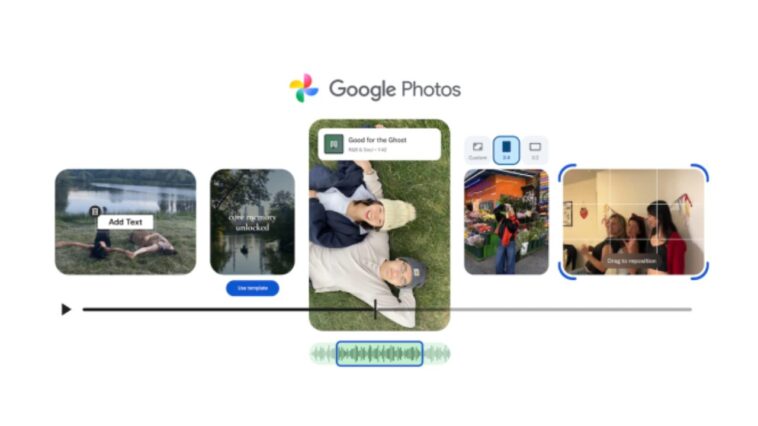
Google Photos announced on Tuesday a set of new tools to simplify video editing and create highlight reels. The update includes specialized templates with preset music and text overlays, as well as a redesigned video editor for both Android and iOS devices.
Easy Highlight Reels with Templates
The new templates, currently rolling out on Android, let users create professional-looking highlight reels in seconds. Users can:

-
Select a preset template
-
Choose photos and videos from their gallery
-
Automatically generate a video synced to the beat of the music
Highlight reels are collections of clips and photos, ideal for memorable moments like vacations, birthdays, or special events. To create one, users can go to the Create tab and click on “Highlight Video.”

Read More: 6 Ways Google Photos’ New AI Tools Will Change How You Edit
Redesigned Video Editor
Google Photos also introduced a new video editor that aims to be more user-friendly. Key features include:
-
Universal Timeline: View all clips and content in one place
-
Adaptive Canvas: Editing interface adjusts to user needs or project type
-
Music and Text Integration: Add both to a single video clip
The redesigned editor will now serve as the default video editing tool on Android, making editing more seamless and efficient.

Read More: Google Photos integrates advanced editing tools from Google One
Customization and Music Options
The update adds several options for personalization:
-
Explore Music Library: Find the perfect soundtrack for highlight videos (available on Android and iOS)
-
Text Overlays on Android: Add custom text with new fonts, colors, and backgrounds for further creativity
With these updates, Google Photos makes it easier than ever for users to turn their photos and clips into polished, shareable videos without needing advanced editing skills.