Hajra Naz

As concerns over digital surveillance and targeted cyberattacks intensify, Meta has introduced Strict Account Settings for WhatsApp—a new security mode designed for users who believe they may be at heightened risk of sophisticated attacks.
The update arrives at a moment when encryption, spyware, and platform trust are under renewed scrutiny, following reports that vulnerabilities in iOS 26.2 were actively exploited to target journalists, public figures, and other high-profile individuals.

Yet even as Meta touts stronger protections, the company finds itself under legal fire. A lawsuit filed in the US District Court in San Francisco by an international group of plaintiffs alleges that WhatsApp can “store, analyze, and access virtually all users’ purportedly private communications”—a claim Meta has firmly rejected.
Meta Pushes Back Against Lawsuit Claims

Meta spokesperson Andy Stone dismissed the lawsuit as baseless, calling the allegations “categorically false and absurd.”
“Multiple experts have commented the same,” Stone said, describing the case as “long on accusations and thin on any sort of evidence” and labeling it a “frivolous work of fiction.”
Still, the timing has placed Meta in a difficult position: unveiling one of WhatsApp’s most advanced security upgrades while simultaneously defending its long-standing claims around end-to-end encryption.
Read More: WhatsApp adds a new status-style feature inspired by Instagram Notes
What Are WhatsApp’s Strict Account Settings?
Strict Account Settings are now gradually rolling out to users and can be enabled via Settings > Privacy > Advanced. WhatsApp explicitly advises users to turn the feature on only “if you believe you are at risk of a cyberattack.”
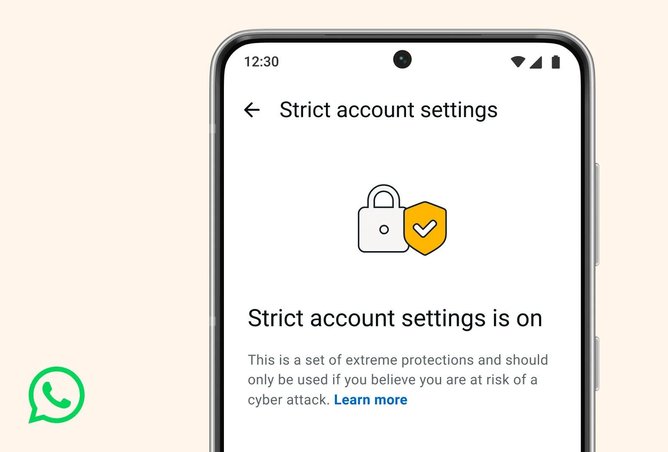
Unlike cosmetic privacy toggles, Strict Account Settings work almost entirely behind the scenes. The goal is not to change how WhatsApp looks or feels but to harden how it handles media files, attachments, and incoming data, particularly from unknown senders.
At a high level, the mode applies more restrictive defaults across the app, including:
-
Blocking or limiting media and attachments from unknown contacts
-
Adding deeper inspection of images, videos, documents, and PDFs
-
Reducing exposure to files that may exploit operating system or library vulnerabilities
The approach mirrors similar high-security modes already introduced by platform owners, such as Apple’s Lockdown Mode and Android’s Advanced Protection Mode.
Why Media Files Are a Serious Security Risk
WhatsApp’s renewed focus on media handling is rooted in lessons learned nearly a decade ago.
In 2015, Android devices were hit by a critical vulnerability known as Stagefright, which allowed attackers to compromise phones simply by sending a malicious video file. In some cases, the exploit could trigger as soon as the file was processed—without the user opening or tapping anything.
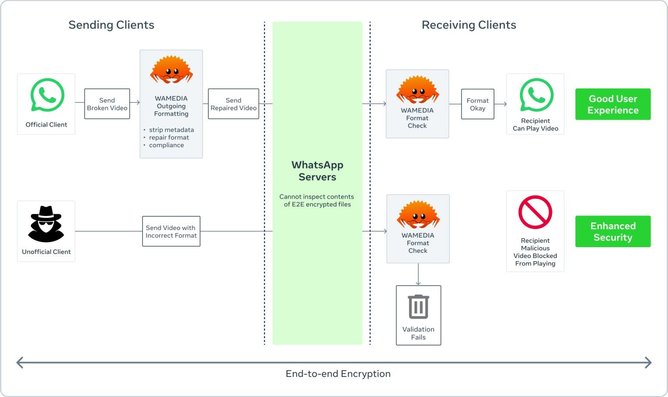
At the time, WhatsApp responded by modifying its cross-platform media library to detect malformed MP4 files that could trigger those operating system bugs. This allowed WhatsApp to protect users faster than waiting for device manufacturers and carriers to roll out OS updates—something many users never installed anyway.
According to the US Cybersecurity and Infrastructure Security Agency, Stagefright affected Android versions 2.2 through 5.1.1_r5 and could allow attackers to access multimedia files or potentially take control of vulnerable devices.
From C++ to Rust: Rebuilding WhatsApp’s Media Engine
The original WhatsApp media library—internally known as Wamedia—was written in C++, which offered performance but came with a familiar problem: memory safety.

C++ relies heavily on manual memory management and developer discipline, making it vulnerable to bugs such as use-after-free errors, dangling pointers, and data races—exactly the kinds of flaws attackers love to exploit.
To address this, Meta’s engineers rebuilt Wamedia in Rust, a programming language designed to enforce memory safety at compile time.
According to WhatsApp engineers Daniel Sommermann and Baojun Wang, the transition was substantial:
-
160,000 lines of C++ code were replaced
-
With 90,000 lines of Rust, including tests
-
The new library was rolled out across Android, iOS, desktop apps, web, and wearables
Rust not only reduced the attack surface but also proved more memory- and performance-efficient. Meta believes this represents the largest global deployment of a Rust-based library to date.
Read More: WhatsApp New Chat History Feature Is Changing Group Conversations
Inside “Kaleidoscope,” WhatsApp’s New File Defense System
On top of the Rust rebuild, WhatsApp has bundled a layered set of file inspections into an internal system called Kaleidoscope.
Kaleidoscope performs structural checks on incoming files before they reach more fragile parts of the device or operating system. These checks include:
-
Flagging PDFs that contain embedded files or scripts
-
Detecting files that masquerade as other formats via spoofed extensions or MIME types
-
Identifying “structurally conformant” files that still carry risk indicators
-
Blocking files that fail validation before they can be processed
The system is also designed to defend against parser differential exploits, where attackers craft files that behave differently depending on which software parses them.
While no system can catch every malicious payload, Kaleidoscope is designed to significantly reduce the chance that a media file can exploit downstream libraries.
Recent Bugs Highlight the Need for Stronger Defaults
The rollout of Strict Account Settings follows renewed attention on WhatsApp after an Android bug made headlines for allowing malicious media files in group chats to be used as an attack vector—sometimes without user interaction.
In those cases, simply being added to a group chat could expose users to booby-trapped files, reinforcing a long-held security concern: attacks often target operating systems and media libraries, not the messaging apps themselves.
By blocking or heavily scrutinizing media from unknown sources, the Strict Account Settings aim to close that gap.
More Than Just Media Protection
Strict Account Settings are part of a broader WhatsApp security posture that includes:
-
Silencing unknown callers, which can help disrupt social-engineering and targeted harassment campaigns
-
Protect IP Address in Calls, a setting that hides a user’s location from call recipients
-
A robust Meta Bug Bounty Program, which offers substantial rewards to researchers who responsibly disclose vulnerabilities
Together, these measures reflect a shift toward layered defenses rather than relying solely on encryption.
Read More: WhatsApp to Charge Developers for AI Chatbots in Italy
Security Gains, Trust Questions Remain
WhatsApp’s new protections represent a meaningful investment in user safety—particularly for journalists, activists, and others who face elevated digital threats.
However, the lawsuit alleging access to private communications underscores a broader tension facing Meta: technical security improvements do not automatically translate into public trust.
Strict account settings are not a guarantee of safety, nor a reason to abandon caution. But they do signal that Meta is taking the evolving threat landscape seriously—and is willing to re-engineer core systems to respond to it.
For everyday users, the changes are mostly invisible. For high-risk users, they may be essential. And for Meta, they arrive at a moment when credibility around privacy and encryption matters more than ever.