
 Hajra Naz
In short, 2025 is when AI-powered dictation becomes a fact of life as opposed to a party trick productivity hack. Dictation software has been available for decades, but for the most part, it was slow, error-prone, and unforgiving—particularly to anyone with an atypical accent or speed of speech or conversational aspect in phrasing.
What shifted wasn’t only accuracy but comprehension. Developments in large language models (LLMs), multimodal speech-to-text systems, and contextual reasoning have made it possible for modern dictation applications to infer meaning, structure, and intent instead of straight transcription of words. Now, these utilities recognize pauses, filter out fillers, and auto-format what was said—generating clean output that needs little or no editing.

Meantime, dictation in 2026 is about more than just taking speech to text. The best modern tools are designed to work seamlessly with email clients, coding environments, messaging apps, and knowledge bases. They tune their generation based on tone, remember vocabulary about the user, respect privacy constraints, and work more and more offline or on-device.
With dozens of AI dictation tools now on the market, choosing the right one depends on
- How do you work?
- How much control do you want?
- How sensitive is your data?
Read More: Top Bookmarking Apps to Keep Your Digital Life Organized
Below is our updated selection of the most useful and capable AI-powered dictation apps to consider in 2026.
Wispr Flow

Wispr Flow has established itself as among the most polished of AI dictation tools, with lots of funding behind it and a growing list of features. It has native apps for macOS, Windows, and iOS—and support for Android is equally impressive and is actively being worked on.
One of Wispr Flow’s best attributes is customization. It allows users to add their own words, phrases, and commands—very useful for professionals using speech recognition for developing industry-specific terms. The app lets you select different transcription styles—like “formal,” “casual,” or “very casual”—based on whether you’re typing out emails, internal messages, or personal notes.
Developers will enjoy working with `Wispr Flow’ as it fits great into any vibe-coding workflow. When combined with utilities such as Cursor, it can automatically detect variables, file names, and code-related constructs while dictating, which will minimize the friction between speech and coding.
There is a free tier that provides up to 2,000 words per month on desktop and another 1,000 words per month if using it via iOS. The paid plans start at $15 per month and feature unlimited transcription as well as advanced customizations.
Willow

Willow markets itself as a time saver for those who would rather talk than type, especially when it comes to longer-form text. Beyond just basic dictation and formatting capabilities, Willow leverages large language models to take short spoken requests and turn them into full paragraphs.
Privacy is a big emphasis for Willow. All transcripts are locally cached on your device, and you can opt out of any model training. That could make it attractive for professionals with sensitive information to ensure that they know exactly where their data is living.
The app also supports custom vocabulary, allowing it to adapt to specialized terminology, professional jargon, or regional dialects over time. Willow offers 2,000 free dictated words per month on desktop. Individual plans start at $15 per month and include unlimited dictation along with the ability for the app to learn and maintain your writing style.
Read More: Lovable AI: How to Build Mobile Apps and Websites with Ease
Monologue
Monologue is meant for those users who seek privacy and offline work first of all. The app lets you download its speech-to-text model and do full transcriptions on your local device sans cloud processing.
Beyond privacy, Monologue also allows customization of the skill depending on the app you’re using to dictate (or another context in which you’re dictating). This makes it handy for writers who switch often between professional writing, casual messaging, and intentional documentation.
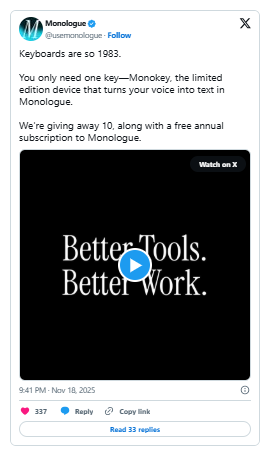
The free tier includes 1,000 words per month. Paid subscriptions cost $10 per month or $100 per year. Notably, highly active users may receive a physical “Monokey,” a custom hardware accessory designed to integrate with the app—a quirky but distinctive touch in a crowded market.
Superwhisper
Superwhisper sits at the intersection of dictation and transcription. While it functions as a real-time voice-to-text tool, it can also transcribe audio and video files, making it useful for meetings, interviews, and recorded notes.
One of its defining features is flexibility. Users can choose from multiple AI models, including Superwhisper’s own options that trade speed for accuracy, as well as Nvidia’s Parakeet speech-recognition models. Advanced users can also write custom prompts to guide output style and structure.
The app displays both raw and processed transcripts and integrates directly with the system keyboard. The basic voice-to-text functionality is free, while Pro features—including translation and file transcription—come with a 15-minute trial.
Paid plans allow users to bring their own AI API keys and connect both local and cloud-based models without usage caps. Pricing includes $8.49 per month, $84.99 annually, or a $249.99 lifetime license.
Read More: Meet Plaud Note Pro: Your AI Assistant for Meetings, Calls, and Creative Thinking
VoiceTypr
VoiceTypr is fundamentally different in that it relies on offline-first use and forgoes the subscription model. It uses local transcription models and is available as open-source on GitHub for those who prefer to self-host or customize their setup.
VoiceTypr Supported by over 99 languages, VoiceTypr is compatible with both macOS and Windows, making it usable for all multilingual users or international teams. Following a three-day free trial, users can buy a lifetime license that costs $35 for one device ($56 for two devices or $98 for four devices).
This pricing model makes VoiceTypr particularly attractive for users who want long-term access without ongoing costs.
Aqua
Aqua is a Y Combinator–backed voice-typing app for macOS and Windows that emphasizes speed and low latency. It markets itself as one of the fastest dictation tools available, aiming to keep pace with natural speech without noticeable delays.
In addition to handling grammar and punctuation, Aqua supports voice-triggered autofill. For example, saying “my address” can instantly insert a predefined block of text. This feature is especially useful for repetitive inputs such as forms, emails, or templates.
Aqua also offers its own speech-to-text API, allowing other applications to integrate its transcription engine. The free plan includes 1,000 words per month, while paid plans start at $8 per month (billed annually) and unlock unlimited dictation along with up to 800 custom dictionary entries.
Handy
Handy is a free, open-source transcription tool available on macOS, Windows, and Linux. While it lacks advanced customization and polish, it provides a straightforward way to begin experimenting with voice-based workflows without any financial commitment.
The app includes a simple settings panel where users can enable push-to-talk, assign hotkeys, and control basic behavior. For users who want a lightweight, no-frills introduction to dictation, Handy remains a solid option in 2026.
Typeless
Typeless is notable for its generous free tier and strong privacy practices. The company says it does not store user data, nor use it for model training, which may be a draw for users, particularly those with a strong focus on privacy.
The app also provides real-time sentence polishing; cleaner or clearer alternatives are suggested if your spoken entry trips over itself, fumbles with vocabulary, or is otherwise less than entirely clear. Typeless makes 4,000 words a week—about 16,000 words per month—available on its free plan.
Subscriptions cost $12 per month (billed annually) and unlock unlimited use as well as early access to new features. Typeless runs on macOS and Windows right now.
Read More: ChatGPT is Now One of the Most-Used Apps on Earth: 2.5 Billion Daily Prompts
Choosing the Right Dictation App in 2026
In 2026, AI dictation isn’t even a question of whether the technology works—it obviously does. The true differentiators are privacy, integration, speed, customization, and how well a tool fits into your daily workflow. Like a third hand, the best dictation app should fade into the background and let you think out loud while taking notes or writing a first draft without friction.
With the rise of increasingly advanced AI models, dictation tools sometimes feel less like utilities and more like silent collaborators—nudging how we write, code, and communicate.


