Hajra Naz

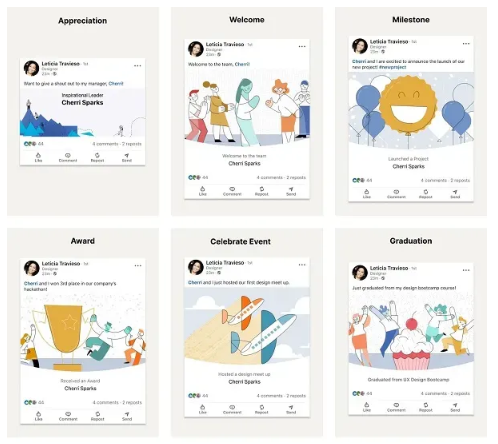
LinkedIn is giving professional announcements a fresh look. It has launched 16 new achievement animations and image templates. These help milestones like new jobs, work anniversaries, promotions, and project completions stand out in the feed.
For years, LinkedIn users had only a few built-in GIFs and templates. These included sunshine rays, flying airplanes, cupcakes, and other simple celebratory visuals. While fun at first, these designs had become a bit stale. Some were even retired late last year. Now, LinkedIn is injecting new life into the feature with fresh, modern designs aimed at matching different posting styles and personal branding preferences.

What’s New?
According to Sarah Alpern, LinkedIn’s Head of Design, the update is about giving members more ways to express their professional achievements visually:
“Starting today, you’ll begin to see 16 new celebration animations to choose from whenever you post about a new job, project, milestone, or anniversary, giving you options that match your personal style and message. The way you post will stay mostly the same, but these new visuals will help your story shine even brighter.”
The new animations include playful yet professional effects like:
-
Fireworks bursting to mark major milestones
-
Flowers blooming to symbolize growth and achievement
-
Pages turning for new career chapters
-
Animated confetti for promotions or successful project completions
These animations trigger as viewers scroll, subtly drawing the eye without overwhelming the post.
Why It Matters for LinkedIn Users
This isn’t a big functional change. But it’s part of a larger trend. Professional networking is becoming more visual and engaging.
In a busy feed, movement draws attention. These animations could help career updates stand out among endless text posts.
More visibility means:
-
Higher engagement with your achievements
-
Better personal branding with creative, tailored visuals
-
Stronger networking opportunities as more people notice your updates
READ MORE: Want More Reach on LinkedIn? Try These 3 Post Styles
How to Use the New Animations Effectively
If you want to make the most of LinkedIn’s new announcement animations, here are some quick tips:
-
Match the animation to your update – Fireworks for big wins, pages turning for a new chapter, blooming flowers for steady growth.
-
Pair visuals with a strong caption – Animations draw them in, but your words keep them engaged.
-
Tag relevant people – Mention colleagues, managers, or collaborators to increase reach.
-
Post during peak times – More active users mean more visibility.
-
Stay consistent – Use these updates as part of your ongoing personal branding strategy.
FAQs
1. How do I access the new LinkedIn animations?
When you post about a milestone, LinkedIn will prompt you. It could be a job change, an anniversary, or a project. You can choose from 16 new celebration animations before publishing.
2. Can I use these animations for any type of post?
They are mainly for professional updates. You can still use them for other announcements if they fit your message.
3. Do these animations work on mobile and desktop?
Yes. The animations display smoothly on both platforms and trigger when someone scrolls past your post.
4. Will using animations improve engagement?
Results may vary. Posts with visuals usually perform better on LinkedIn. They stand out in the feed.
5. Can I customize or upload my animation?
Right now, LinkedIn only offers its built-in animations. You can’t upload custom ones. But you can add your images or GIFs instead of LinkedIn’s templates.